
[FIX] Unity3D Cloud Build Missing Sprites
I was making a build the other day using Cloud Build, but some of the sprites were missing for some reason. Everything looked fine on a local build though.
Turns out I had the sprites in a folder called "Library" in my Unity Project and Cloud Build ignores or strips out content from that folder. The sprites showed up again in the cloud build after renaming the folder.

[FIX] Unity3D - Android - Unable to List Target Platforms
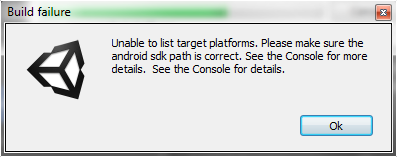
A few months ago I was trying to create an Android build for one of my Unity3D projects which used to be primarily for iOS. When trying to create a build, Unity showed this error:
Error building Player: CommandInvokationFailure: Unable to list target platforms. Please make sure the android sdk path is correct.
[FIX] Unity3D - Animation Must be marked as Legacy Warning

I ran into this warning the other day when I tried adding an animation clip to an object "Animation Component must be marked as legacy", and there was no obvious way to find and fix the legacy problem... After searching a little bit on the internet, I found this solution to fix the warning:
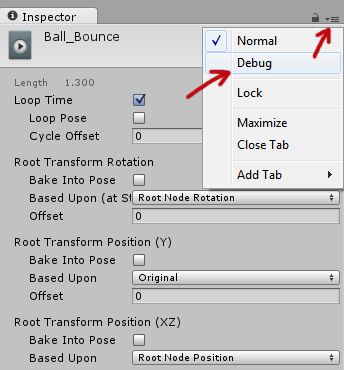
Select the animation clip in your Project > Go to the Inspector tab and clip on the "hamburger" button > Then select "Debug".
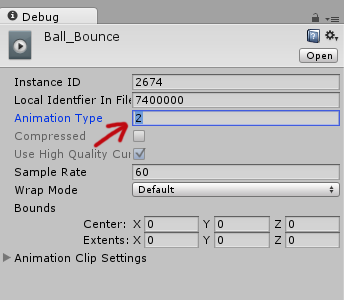
The inspector options will change into debugging mode and there set the "Animation Type" from 2 to 1. Set the inspector mode back to "Normal" through the hamburger button and it's fixed! No more legacy warnings!
[Fix] Joomla: Parameter 1 to modMainMenuHelper

Warning: Parameter 1 to modMainMenuHelper::buildXML() expected to be a reference
At present Joomla! is not certified to work with PHP 5.3.0. If you see this error message on your Joomla website, probably your web host is running PHP 5.3 or recently upgraded to PHP 5.3 (which was my case).
To fix this, go in the helper.php file (/modules/mod_mainmenu/helper.php) and change
function buildXML(&$params)
to
function buildXML($params)
Now the error should be gone!
[How-to-Fix] Catalyst Control Center & Native Resolution

My 23" Dell SP2309W has a native resolution of 2048x1152 and worked fine until yesterday when I tried to update the driver of my ATI Radeon HD 5700 graphic card. After updating, the highest resolution I could select was 1920x1080 and I was unable to set the resolution back to the native 2048x1152 resolution. This was driving me crazy, because everything was all blurry in 1920x1080 :(
The problem seems to occur when you have multiple screens connected to your PC; in my case I have my Dell monitor and my Samsung TV connected to my desktop. Before, my Dell was my primary and my Samsung was my secondary screen, but after the update my Samsung became the primary and my Dell the secondary. Apparently, after updating the drivers, ATI's Catalyst Control Center sometimes selects a different screen as your primary which results that my PC wasn't showing up the native resolution of my 23" monitor. To make it worse, your screen is duplicated across both screens, so it's not apparent that the index of your screens are changed or what so ever.
Anyway, to fix this, just disable your 2nd screen or make your monitor; with the higher native resolution, your primary! Easy as that, but it's not very obvious :)
Unable to open Word Files (Error)
I was going through some old documents when suddenly every single Word file threw in an error causing Word not even to launch and even using the Word Safe Mode launcher didn't help.
I got scared when not 1... not 2... but almost all my Word files started being listed as corrupted!! All my work! OH NO!!! :@
The internet suggested using the Font Restore option under "Control Panel > Appearance & Personalization > Fonts > Font Settings > Restore default font settings", but that didn't fix the problem.... I tried system restore.... NOTHING!! Until I realized that I installed some fonts about a week back.
I opened the Fonts folder and looked up the fonts that I recently installed and I noticed that the icons of those fonts had "$#@" on them instead of "ABC". I tried deleting them, but again error! Saying that the font is currently in use!! Closed all application, but still no luck...
Finally, I booted Windows in Safe Mode and it allowed me to delete those corrupted fonts. Restarted it and BAM! Everything worked again (after 2 hours or rage)! :D *phew*
In short: If you're unable to open your Word files and Word starts throwing in errors, check if you installed any fonts recently. Look them up and see if they are corrupted and delete them if they are. If you're unable to delete them, go in Safe Mode and delete it :)