Annoying Razer Synapse Updates
Ever since I installed Razer Synapse (Cloud-Based Mouse Driver) for my DeathAdder mouse I get very annoyed by the software updates. First of all, 99% of the time the update will require you to reboot your system which no ones likes. Especially when you just booted up your computer. Second, the windows where you confirm the update installation is pretty stupid as well.
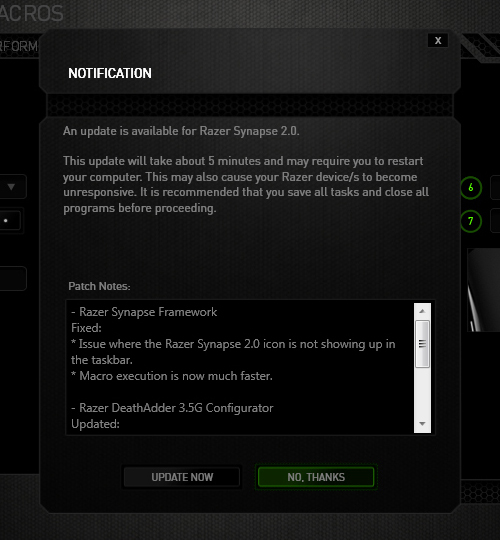
The image below is the default state in which the notification was presented. The "Update Now"(OK) option comes before the "No Thanks"(Cancel) option. Now there's always the debate whether the button arrangement should be "OK-Cancel" or "Cancel-OK". Both button orders are legitimate as the Nielsen Norman Group article points out, but what confused me was the button highlight. While updating the driver would be considered a "dangerous" action. I was immediately drawn to pressing the highlighted button, because in most UI cases they will highlight the option that they want you to press. So combined with the "I-just-want-to-get-this-over-with" mentality, I pressed the highlighted "No Thanks" option thinking it was updating when the window minimized to the system tray. Little did I know the update notification popped up again the next day when I turned on the computer... confused and enraged why Razer Synapse asked me to update again, I then discovered I was pressing the wrong button when I saw the update window for the second time. Am I raging about nothing? Or maybe I should just learn to read next time :(

[How] Android Apps on Blackberry Playbook
Back in March, when I went to the Game Developers Conference (GDC 2012), I received a (free) Blackberry Playbook and have been playing with it from time to time. While the Blackberry Playbook is a pretty good product, the main problem is that there aren't that many good apps for it... for free at least. However, Blackberry recently implemented the Android apps compatibility for the Playbook!
Not all applications work, and they have to be converted into a .BAR format that Playbook can read. You can download the SDK from the Blackberry website and convert them yourself, or just download the apps from CrackBerry, GoodeReader or PlaybookBars. Getting the Android apps on your Playbook is also pretty easy. Here are the steps:
- Download and install the Java Runtime Environment.
- You will need to download and install the DDPB installer.
- Find the Android apps you want for your Playbook.
- Activate Developer Mode on your Playbook (Settings --> Security --> Developer Mode)
- Enter a password for Developer Mode and remember this; you will need it later on.
- Run DDPB on your computer.
- Click "Scan" and you'll see the ip of your Playbook.
- Hit "Connect" and enter the password you just made in the Developer Mode.
- Now, load all .BAR files into DDPB.
- Check the boxes of the apps you want to install and hit "Install".
- Finally, go to your Playbook and you should be able to see the app.
For detailed steps, including pictures, go to [link]
[How] Premiere: Avi File; No Video, Only Audio

Herpderp! I had some trouble importing AVI files to Adobe Premiere. It would only import the audio file and not the video. Same thing in Windows Media Player; no video, only audio, but it worked fine when I opened the file in VLC. Frustrated, tried to convert it to other formats, changing file extensions, installed additional codecs... nothing worked!! After 30 minutes of screwing around I figured it out.
The video was recorded using Fraps at my school, but I was editing the video at home and I didn't have Fraps installed. Apparently, videos recorded by Fraps sometimes require the FPS1 codec from Fraps. So Installing Fraps would also install the FPS1 codec. After that the video worked in Windows Media Player and worked in Premiere!! Yaaaaay!!